Midco Sports Plus
- 2.6
- Rating
- 50.00K
- Installs
- Free
- Price

 Analysis by App-foxy
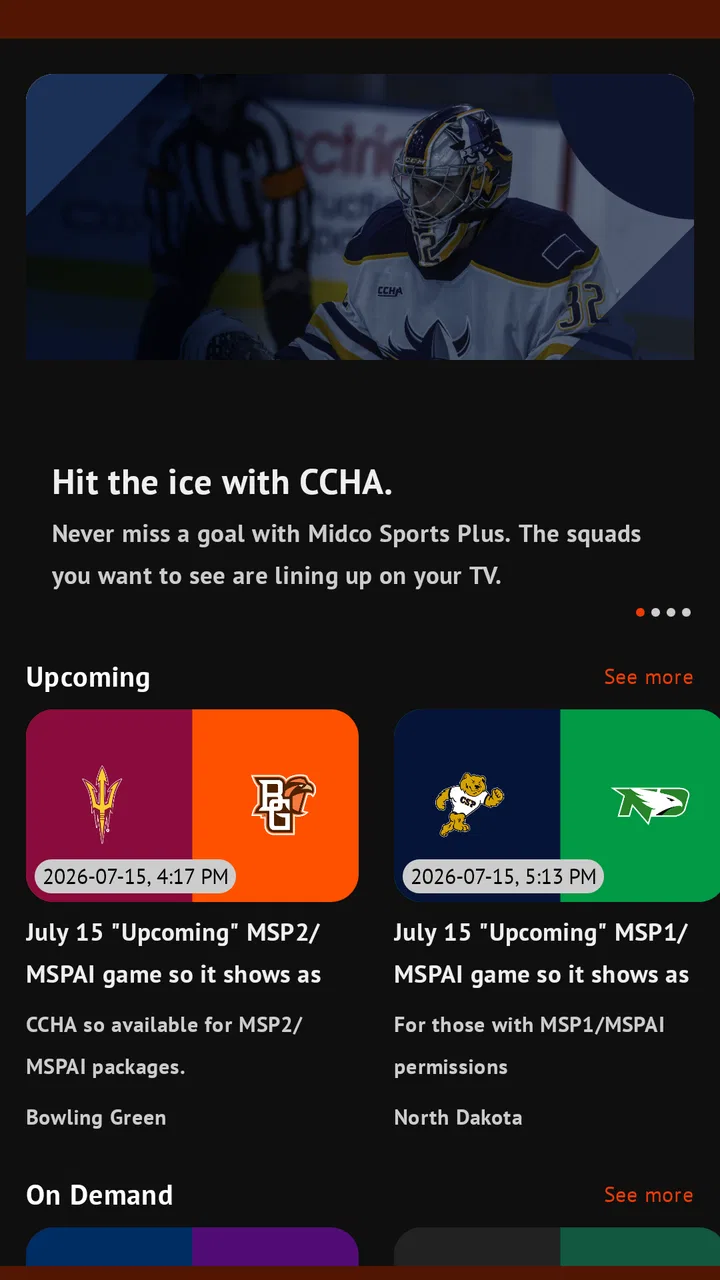
Midco Sports Plus is a free sports app from Midco that I would approach as a focused viewing tool rather than a complete replacement for every sports service. Its purpose is straightforward: it brings live games from regional teams and conferences connected with Midco Sports to a phone or tablet. That narrow focus is also its main appeal. If the teams you follow are part of its coverage, the app can make a game easier to catch when you are away from the television. If your interests are spread across national leagues, international competitions, or several unrelated services, its value becomes much less certain.
I tested it with that distinction in mind. The useful question is not simply whether it can stream sports, but whether it fits into a repeatable routine: finding the right event, checking the viewing setup before the game begins, and avoiding unnecessary friction when the opening whistle is approaching. My overall impression is mixed. The concept is convenient, the free download lowers the barrier to trying it, and the regional emphasis gives it a clear purpose. At the same time, the average rating of 2.6 from around 80 ratings suggests that the experience has not been consistently smooth for everyone.
How I would use Midco Sports Plus on a normal game day
On a normal game day, I’d treat Midco Sports Plus as one part of the viewing plan, not the whole plan: I’d check the event and access prompt early, then keep a familiar alternative ready if the stream won’t start. That approach is especially useful when other people are sharing the network or the main television. It also gives me a clear way to judge whether the app fits my routine over time.
You May Also Like

 Pandora - Music & Podcasts
Pandora’s Music Is Easy to Start, but Harder to Recover
Pandora’s strength is its low-effort path from a seed to a station. Its weak spot is how much confidence it asks you to place in connection, setup, and quiet recovery.

 AccuWeather: Weather Radar
AccuWeather Review: A Quick, Clear Forecast for Everyday Decisions
For everyday plans, the best forecast is the one you can understand quickly. AccuWeather makes rain timing, radar, and local conditions easy to act on, with a few trade-offs.

 Hill Climb Racing
Why Hill Climb Racing Still Turns Crashes Into One More Run
A tiny car, a bumpy hill and one more upgrade: Hill Climb Racing keeps resurfacing because its simple chaos makes every near-miss feel personal.

 AliExpress - Shopping App
AliExpress Makes Global Shopping Feel Personal, but Shoppers Bear the Risk
AliExpress turns a global marketplace into a pocket-sized discovery engine. Its reach is useful, its shopping loop compelling, and its trade-offs easy to miss.

 Lords Mobile: Kingdom Wars
Lords Mobile Is a Kingdom-Building Routine, Not a Quick Match
A case-by-case verdict on the building, battles, device demands, and social commitments that make Lords Mobile rewarding for some players and exhausting for others.

 PDF Scanner app - TapScanner
TapScanner Makes Paperwork Easier to Capture, Check, and Share
TapScanner makes scanning with a phone feel less like a rescue operation and more like a dependable step in getting work done. Its capture tools are useful, though not flawless.
More From Our News Desk
View All News


A simple baseline workflow works best
My preferred routine starts well before the game. I open the app, look for the event I want, and give myself enough time to deal with sign-in, playback, or connection issues instead of waiting until the broadcast is already underway. That small habit matters more here than it might with a general video app, because a live game does not pause its schedule while I troubleshoot.
The app’s identity is important: this is a sports streaming app, not a broad entertainment catalog. I would not open it expecting a deep archive of films, a general television guide, or a universal destination for every team. I use it when the regional coverage is the reason I am watching. That makes the first decision easy: identify whether the event belongs to the Midco Sports offering before building the rest of the evening around it.
For a realistic example, imagine I am visiting family and want to follow a regional college game while the main television is being used for something else. Midco Sports Plus can be useful as a second-screen option. I would connect to a reliable home network, open the event early, and keep the phone or tablet in a stable position rather than treating it like a quick clip. The experience is more practical when I plan around the broadcast instead of repeatedly launching and closing the app.
That workflow also helps separate app problems from network problems. If a stream struggles, I first check whether other devices are using the connection heavily and whether the device has a stable signal. I then restart the app before assuming the service itself is unavailable. These are ordinary steps, but they are especially worthwhile with live video because a short interruption can be more annoying than the same interruption in an on-demand program.
What the app is good at, and what it is not
The strongest use case is a viewer who already knows which regional teams or conferences matter to them. For that person, the app has a job that is easy to understand: provide access to relevant live sports in a mobile format. It can be handy for travel within the home viewing area, for watching from another room, or for keeping up with a game when a traditional television is not available.
I would be more cautious if I wanted a single subscription or app for a wide variety of sports. The regional focus means that a national sports platform may be a better everyday choice for someone who follows major leagues, several markets, or events from different broadcasters. A television provider’s own channel guide may also be more convenient for a household that already watches Midco Sports through a television package and prefers one remote-friendly interface.
There is another practical trade-off. The app is free to install, but in-app purchases range from $15 to $199 per item. That means I would not assume that downloading it automatically grants unlimited access to every stream. Before planning a full viewing session, I would pay attention to the event’s access path and any purchase prompt. The free entry point is attractive, but the eventual cost can depend on what I am trying to watch.
Settings and preparation that are actually worth checking
I would begin with the device itself. The app supports Android 7.0 and later, so older compatible devices may be able to install it, but live video is still demanding enough that age alone does not guarantee a comfortable experience. I would keep the operating system and the app current where possible, close apps that are consuming bandwidth or battery, and make sure there is enough battery for the expected game length.
The current version is 2.0.1, which is useful context when diagnosing an issue. If the app behaves differently after an update, I would first close and reopen it, then check whether the problem is limited to one event or affects the entire app. I would avoid drawing a conclusion from one failed launch. Live sports can involve event-specific access conditions, while a broader loading problem points more toward the app, device, or network.
Notification settings deserve a quick look, but I would keep them purposeful. If the app offers alerts on a particular device, I would enable only the reminders that help me remember a game rather than allowing every possible message. A phone used for work can become distracting if sports notifications arrive throughout the day. On a tablet dedicated to viewing, the same alerts may be more useful.
I would also check display and audio before the broadcast begins. Brightness, screen timeout, orientation, and volume are easy to overlook when a game starts suddenly. A longer screen timeout can prevent the display from going dark during a quiet moment, while headphones can make a mobile viewing session much more comfortable in a shared room. These are not glamorous features, but they are the difference between a prepared setup and constant interruptions.
For anyone considering a purchase, I recommend deciding in advance whether the game is worth the listed charge rather than tapping through quickly. The range up to $199 per item is wide enough that I would read the purchase screen carefully and confirm exactly what the payment covers. I would also check whether the viewing situation truly requires the app or whether the same event is already available through a television service I pay for. That comparison can prevent paying twice for access.
Faster habits for repeat viewers
Experienced users can make the app feel less cumbersome by turning game watching into a checklist. I would keep the app on the device I use most often, sign in before the event day if an account is required, and open it several minutes ahead of time. I would also save the event details in my calendar independently rather than relying entirely on a notification. That way, the app handles viewing while the calendar handles planning.
A second useful habit is to test the exact device and network combination I expect to use. Watching on a home tablet may work well, while watching on a phone over mobile data may be less predictable. I would not assume that a successful session in one location guarantees the same result elsewhere. For travel, I would open the app before leaving reliable Wi-Fi and make sure I understand the event’s access requirements while there is still time to adjust.
When a stream pauses, I would avoid repeatedly pressing play in rapid succession. I would wait briefly, check the connection, and restart the app only when necessary. Repeated taps can make it harder to tell whether the service is recovering or whether several requests have piled up. A calm recovery routine is especially helpful during live action, when frustration can lead to accidental purchases or unnecessary account changes.
I would also choose the viewing device based on the situation. A phone is convenient for checking a game while moving around, but a larger tablet is usually better for a full match or a long broadcast. If I need to watch while doing household tasks, I would position the device safely and keep the audio at a level that does not force me to stare continuously at the screen. The app is most useful when it fits the way I already spend the evening, not when I try to turn every viewing session into a complicated setup.
Where the experience can become limiting
The modest rating is a reason to keep expectations realistic. I would not describe Midco Sports Plus as a universally polished sports hub based solely on its purpose. The most important weakness for me is uncertainty around consistency: a live-streaming app has to work at the precise moment a game begins, and even a minor login, loading, or playback problem feels significant then.
Regional coverage is another boundary. The app may be exactly right for a supporter of the teams and conferences it serves, but it is not automatically the best choice for someone whose interests change from week to week. A broad sports service can be more efficient when I want one place to follow many competitions. Conversely, a team-specific or conference-specific option may be a better fit if it offers more dependable access to one particular schedule.
The purchase model also requires attention. Free installation is helpful for testing the interface, but it does not remove the need to understand event access. A viewer who dislikes pay-per-event decisions may prefer a service with a clearer recurring plan, while someone who watches only occasional regional games might appreciate paying only when a particular broadcast matters. The right choice depends on frequency, not just the headline price of the download.
I would skip this app if I mainly want scores, news, or short highlights. A live video service is more than I need for quick updates, and a sports news app would likely be faster for checking a result. I would also look elsewhere if my priority is watching on a television with a highly refined remote-control experience. Midco Sports Plus is more naturally suited to mobile and personal viewing than to replacing every part of a living-room setup.
Privacy, age suitability, and household use
The content rating is Everyone, so the app is broadly suitable from an age-rating perspective. In a family setting, I would still treat the purchase controls seriously. A child using the device should not be able to approve an in-app purchase accidentally, especially when individual items can be expensive. Device-level purchase authentication is a sensible precaution for any shared phone or tablet.
I would also think about account and device habits in a household. If several people want to watch different games, the practical question is not only whether the app is installed, but whether each person knows which event they are opening and what access it requires. Clear communication can prevent two family members from making separate decisions about the same broadcast or assuming that one person’s setup automatically covers another device.
Because the developer is Midco, the app makes the most sense for people already familiar with Midco Sports and its regional role. That does not mean every Midco customer will use it in the same way, but it does make the surrounding service context relevant. I would compare the app with whatever television or streaming arrangement I already have before treating it as a replacement. Sometimes the best use is as a companion screen rather than the main source of sports.
My verdict after building a repeatable routine
After using it as a focused regional sports viewer, I see a useful but specialized app. The free download makes it easy to investigate, and the Everyone rating keeps the entry point uncomplicated for households. Its strongest quality is not variety; it is the possibility of getting a relevant regional game onto a personal screen without needing to be in front of the main television.
The deciding factor is coverage, not the download price. If the teams and conferences I care about are available and I am comfortable checking event access before game time, Midco Sports Plus can earn a place in my sports routine. I would prepare the device, confirm the network, review any purchase screen carefully, and use a calendar reminder so the app is part of a reliable habit rather than a last-second experiment.
My recommendation is therefore conditional. Regional fans who want mobile access should give it a fair try, especially if they already follow Midco Sports. Viewers seeking a broad, consistently polished home for every sport should compare it with a national streaming service or their existing television provider. With around 50 thousand installs, it has found a real audience, but the 2.6 average rating tells me to keep a backup plan for important games.
In the end, Midco Sports Plus is best understood as a targeted tool: valuable when its regional coverage matches my schedule, less compelling when I expect a complete sports universe. I would recommend it to a friend with that qualification clearly stated. Try it before game day, learn how your preferred events are accessed, and decide whether its focused role complements or duplicates the services you already use.
FAQs for Midco Sports Plus
01What is Midco Sports Plus?
Midco Sports Plus is a streaming service focused on live and on-demand sports coverage, particularly events connected with Midco Sports and regional college athletics. After installing the app, users can browse available games, schedules, replays, and related programming in one place. The exact content shown can vary by location, season, broadcasting rights, and the user’s subscription or access method.
02Do I need a subscription to watch Midco Sports Plus?
Access requirements depend on the event and your television or internet provider. Some content may be included for eligible Midco customers, while other programming can require a separate subscription, login, or authenticated provider account. Before downloading, check the current plan details and supported service area, because installing the app alone does not necessarily provide access to every live stream or on-demand video.
03Which devices are compatible with Midco Sports Plus?
Midco Sports Plus is designed for mobile viewing on supported Android and iOS devices, and availability may also extend to selected web browsers or connected-TV platforms. Compatibility can change as the app is updated, so users should check the Google Play Store or Apple App Store listing for current operating-system requirements. Older phones or tablets may not support every feature smoothly.
04Can I watch Midco Sports Plus outside the Midco coverage area?
Streaming availability is generally controlled by regional broadcasting rights, account eligibility, and location restrictions. As a result, some events may only be available within a designated Midco service region, even when the application can be downloaded elsewhere. If you travel, use a VPN, or connect through an unusual network, playback may be limited or blocked. Review the service terms before relying on it while away from home.
05Does Midco Sports Plus support live streaming and replays?
The app is primarily intended for live sports streaming, and available events may also include archived games, highlights, or replay content. The selection is not identical for every sport or competition, since replay availability depends on licensing and production schedules. For the best experience, use a stable Wi-Fi or mobile-data connection, keep the application updated, and verify the event schedule before game time.
Pros
- Live access to Midco Sports Network events and regional sports coverage.
- Supports streaming on compatible phones
- tablets
- and connected TV devices.
- Useful schedules and event information help fans find upcoming broadcasts.
- Video replays let you catch games and events you missed live.
- A focused sports catalog makes navigation straightforward for Midco viewers.
Cons
- Availability is limited mainly to Midco service areas and eligible subscribers.
- Some content may require a separate Midco internet or TV subscription.
- Regional rights can restrict access to certain games outside the coverage area.
- Streaming quality depends heavily on your internet connection and device.
- The app may offer fewer sports and features than larger national streaming services.

Midco Sports Plus
Gallery